User-Friendly and Simple to Design with NB Faceplate
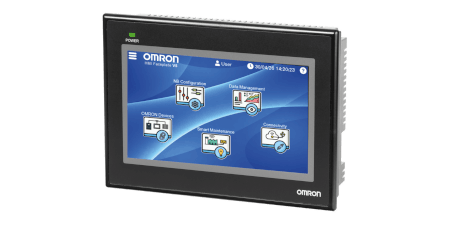

Our cost-free NB-Faceplate makes the integration process smoother by facilitating connections with OMRON devices and the configuration of essential HMI functions, such as communication, settings, recipe management, multilingual support, trend analysis, data logging, and security options.
- Save development time on your NB application by simply copying and pasting pre-made pages, then customizing them to match your graphical layout.
- Monitor and control OMRON products with the compact NB Series HMI through ready-to-use interface pages.
- Direct connection to OMRON Products without using the PLC.

The Five Pilars of NB Faceplate
The NBConfiguration pages provide a ready-to-use interface for configuring various HMI settings.
The Data Management pages showcase how to work with data from various sources such as a PLC, USB drive, FTP Server.
The Connectivity pages display all devices configured to communicate with the NB HMI as well VNC Server, FTP Server, Web Interface.
The Omron Device Pages enabling easy connection, monitoring, and control of each device’s main functions.
The Smarter Maintenance pages connects to condition monitoring and other strategic devices to deliver timely, accurate maintenance information to the right people at the right time.
NB Configuration
The NB Configuration page provides a ready-to-use interface for configuring various HMI settings. These include real-time clock adjustment, screen brightness control, touch screen calibration, IP address configuration, screen saver settings, and buzzer control. Additionally, it supports multilingual functionality, offering a selection of 12 different languages.
This section also demonstrates how to create and acknowledge events and alarms. Four distinct alarms can be simulated using the buttons located on the right side of the screen.
These simulations trigger alarms that are displayed through the Alarm and Alarm Display components. Additionally, the section includes a user permissions feature, which enhances the overall security of the NB project.
Data Management
The Data Management page showcases how to work with data from various sources such as a PLC, USB drive, and how to manage CSV files and recipe functions—including adding, searching, editing, and sorting entries.
When a USB drive is connected to the PT, the "Stick Present" indicator lamp turns green, confirming that the device is recognized and ready for use.
The Import/Export Data feature enables the transfer of data between the NB HMI’s ERW memory area and a CSV file on the USB stick. This functionality can also be integrated with an FTP server, allowing data to be imported from a remote PC to the NB HMI or exported from the NB HMI to a remote PC.
Connectivity
The Connectivity page displays all devices configured to communicate with the NB HMI. It offers possibility to enable or disable communication with the devices. If certain devices are not part of your network, their configuration can be adjusted to prevent communication error pop-up messages from appearing.
VNC Server: From this screen, you can enable or disable the VNC Server and switch between Monitor mode and Operation mode as needed.
FTP Server: This section allows you to enable or disable the FTP Server and provides relevant FTP Server information.
Web Interface: This section allows you to enable or disable the Web Interface functionality. It also displays the URL used to access the NB HMI’s active program remotely.
OMRON Devices
Ready-to-use interface screens are available for various OMRON devices, enabling easy connection, monitoring, and control of each device’s main functions.
Smarter Maintenance
The Smarter Maintenance pages connect to condition monitoring and other strategic devices to deliver timely, accurate maintenance information to the right people at the right time.
Download NB-Designer Software
-
NB-Designer offers all the tools and features needed to quickly develop intuitive and flexible operator screens.
-
You can build your own applications with powerful macros for complex operations, design dynamic and user-friendly interfaces using flexible window management, and enhance interactivity with easy-to-implement animations and component movements.
-
The software also supports event monitoring (such as alarms), recipe management, and multilingual interfaces.
Download NB Faceplate Project
-
The complimentary NB Faceplate project simplifies integration by streamlining connections to our devices and configuring key HMI functionalities. By downloading the NB HMI faceplate project, you can significantly reduce development time for your HMI applications.
-
Start with a complete Compact HMI project that you can easily customize and expand. It includes reusable pages for HMI settings, multilingual support, and security features.
-
You will also find ready-to-use examples for recipe management, trend graphs, data storage on USB drives, and connectivity options such as FTP and VPN configuration. Alarm and event handling examples are also included.
-
Most importantly, it enables direct connection and monitoring of various OMRON devices, such as inverters, PLCs, safety controllers, and other components.
Learn How to Use the NB Faceplate and Explore Its Features
Enhance your HMI development skills with our comprehensive training resources:
Video Training on YouTube
Access a full playlist of 14 tutorial videos, divided into two sections:
- Introduction videos
- Step-by-step customization guides
All videos include English subtitles, with automatic translation available on YouTube. Watch the YouTube Videos